Rackpulsenow
web-1 needs a reboot to finish updates
Started 08:12. Rule: Reboot required.
Your servers in your Mac menu bar
Rackpulse shows your cloud servers from all your projects: whether they are running, how busy they are, and what they cost this month. It sends a notification when something goes wrong. Connect a provider with an API key, add the agent to see inside a server, or use the agent alone on any Linux server.
v0.3.0 · macOS 14 or later · free, open source (MIT) · no account, no telemetry

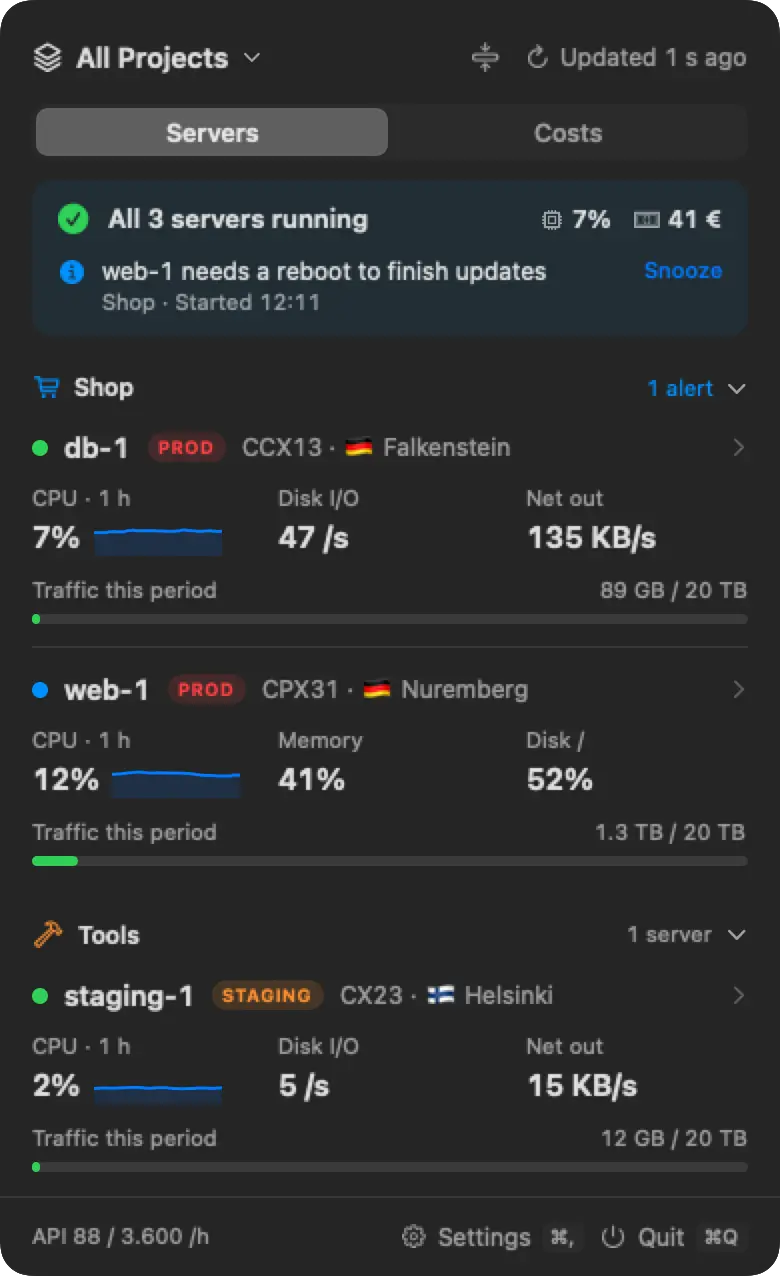
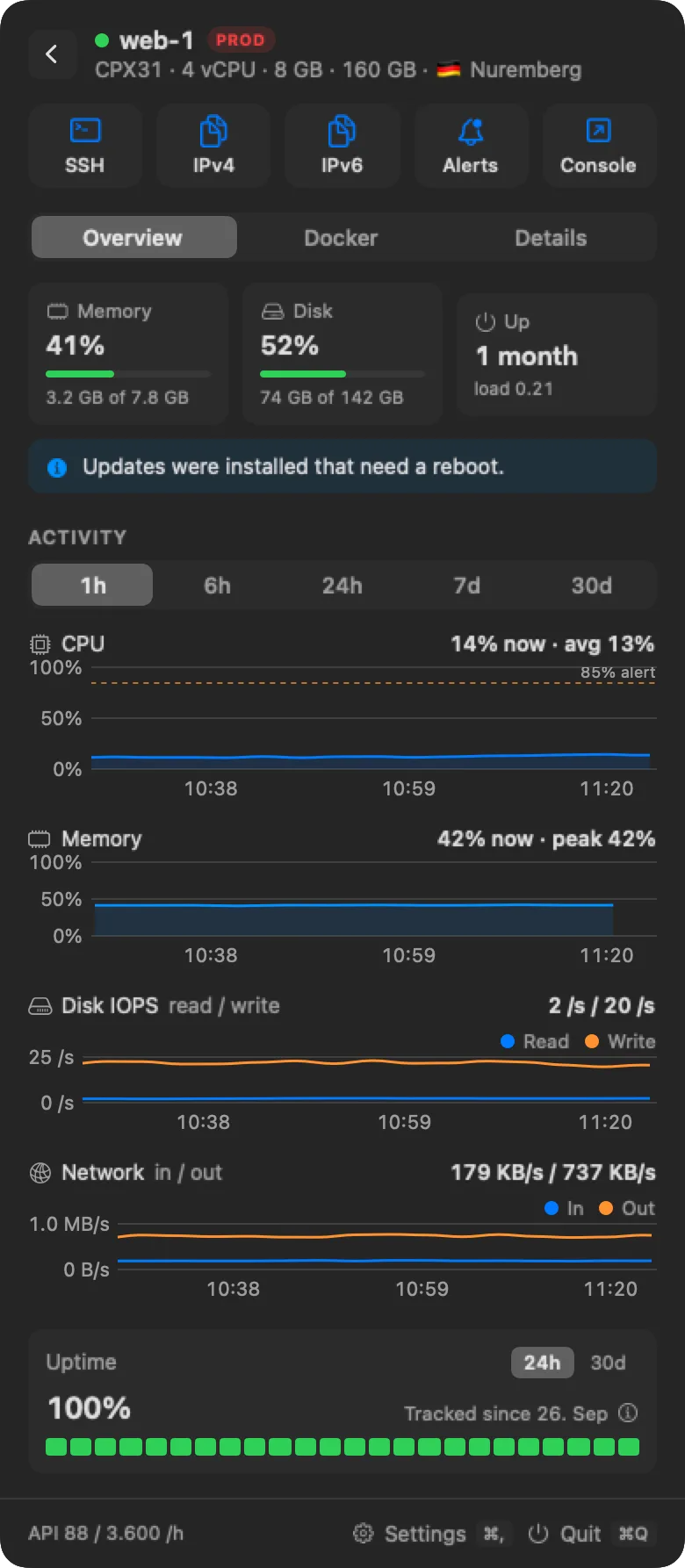
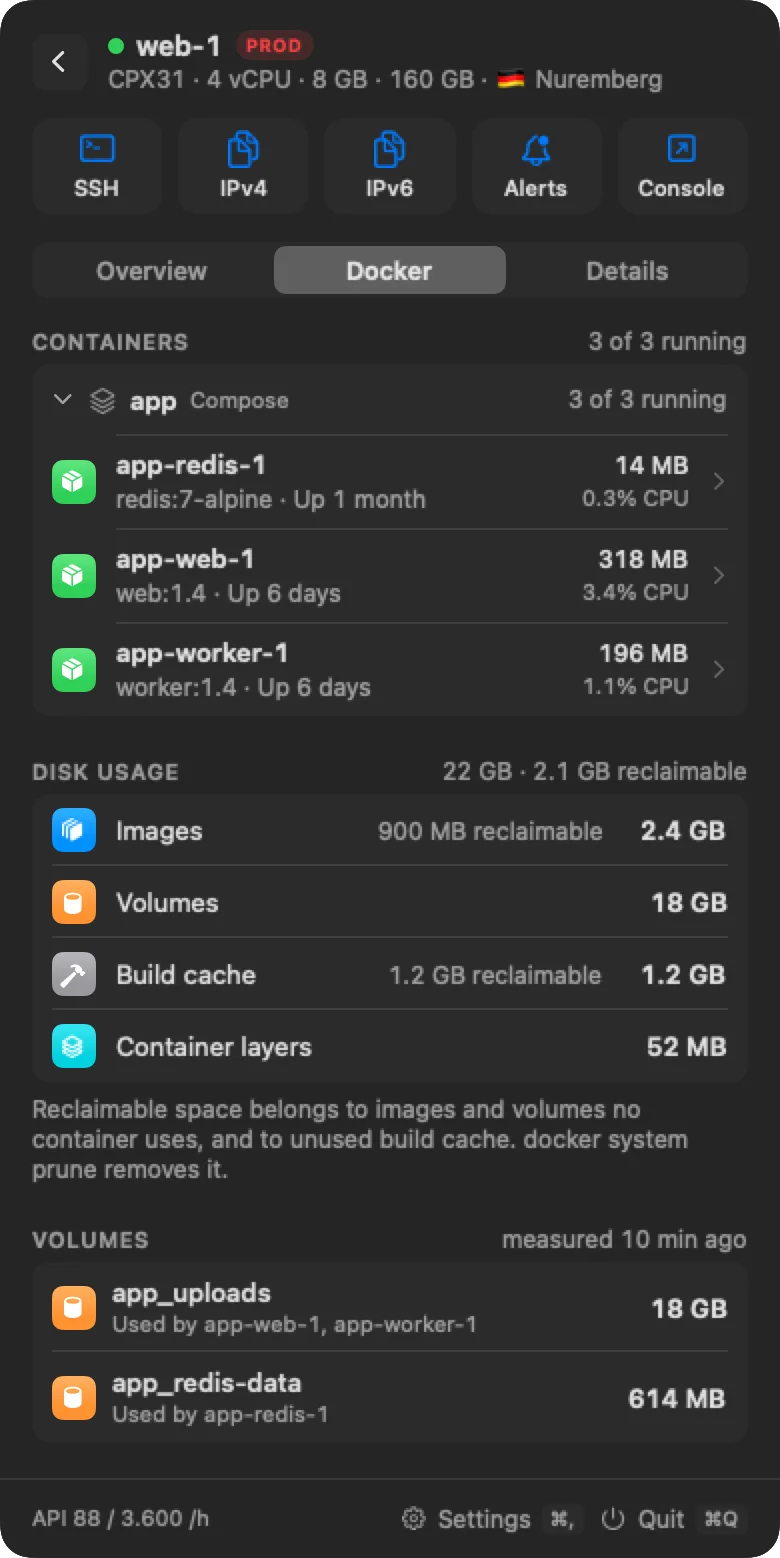
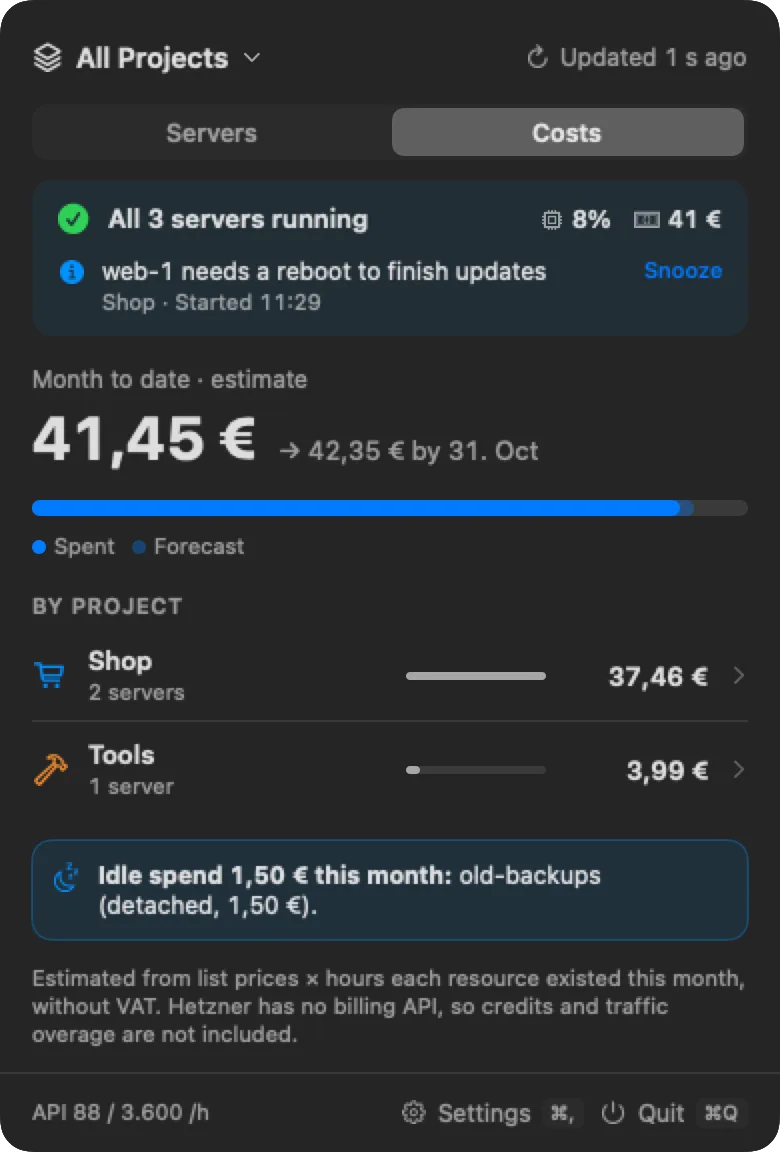
The panel, with sample data
db-1Uptime, last 30 days99.9%
30 days agosample datatoday
Connect a provider, add the agent where you need it
Rackpulse reads your cloud provider's API with a key you create, so it needs nothing on your servers. The agent is a small read-only Linux program that adds what a provider's API can't see, and it also works on its own, on servers with no supported provider. You can mix all three.
Hetzner Cloud
AvailableOne API token per project. Servers, volumes, IP addresses, firewalls, metrics, and prices
Agent only
AvailableServers on any host with the agent and no provider account: home lab, bare metal, or any cloud. They live in their own projects
awsMore providers
Coming soonAWS, DigitalOcean, and Railway are listed in the app, with the same experience through each provider's API
| Feature | Provider keynothing installed | Agentwith a provider key | Agentagent only |
|---|---|---|---|
| Servers | |||
| Running status and a one-line summary | |||
| CPU, disk I/O, and network charts | |||
| Traffic against the included amount | |||
| Power controls and the provider's console | |||
| Costs, budgets, and idle spend | with a price you enter | ||
| Inside the server | |||
| Memory and load | |||
| Disk space per file system | |||
| Failed services and pending reboots | |||
| Docker | |||
| Containers with health, restarts, CPU, and memory | |||
| Container pages and Docker disk usage | |||
| Uptime | |||
| From the provider's start and stop history | |||
| Recorded on the server, including crashes the provider can't see | |||
| Installed on your servers | nothing | read-only agent | read-only agent |
Every server and its cost, one click away
Everything here works with a provider's API key alone. Nothing is installed on your servers.
One status line
"All 5 servers running" or "1 not running · 2 alerts" across all projects, in the colour of the worst alert.
Grouped by project
Servers from all your projects, with problems sorted to the top. Switch to a single project from the menu.
Environments
Tag each server as Production, Staging, or Development, or let Rackpulse read an env label from the provider.
FinderFileEditView 09:41
09:41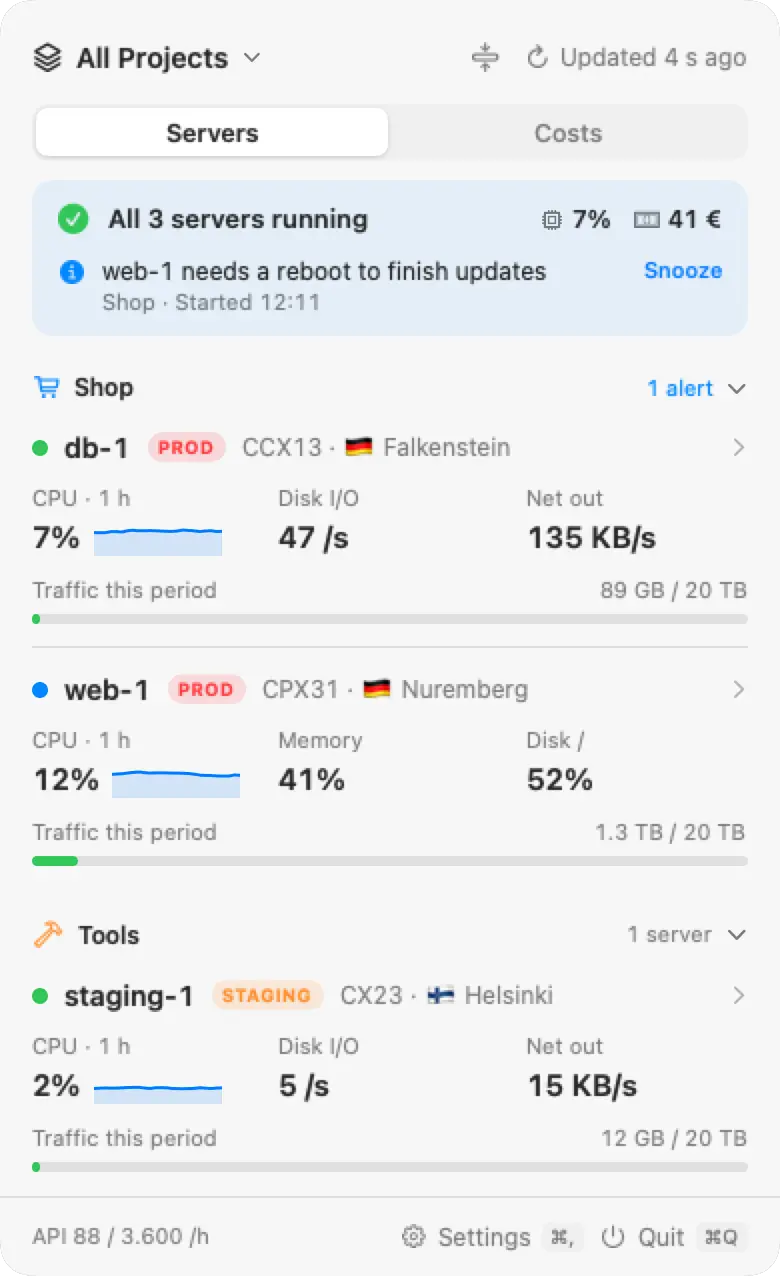
Charts
CPU, disk IOPS, and network for 1 hour, 6 hours, 24 hours, 7 days, or 30 days. Hover a chart to read any moment.
Uptime
The last 24 hours and 30 days, from the provider's start and stop history and Rackpulse's own checks.
FinderFileEditView09:41
09:41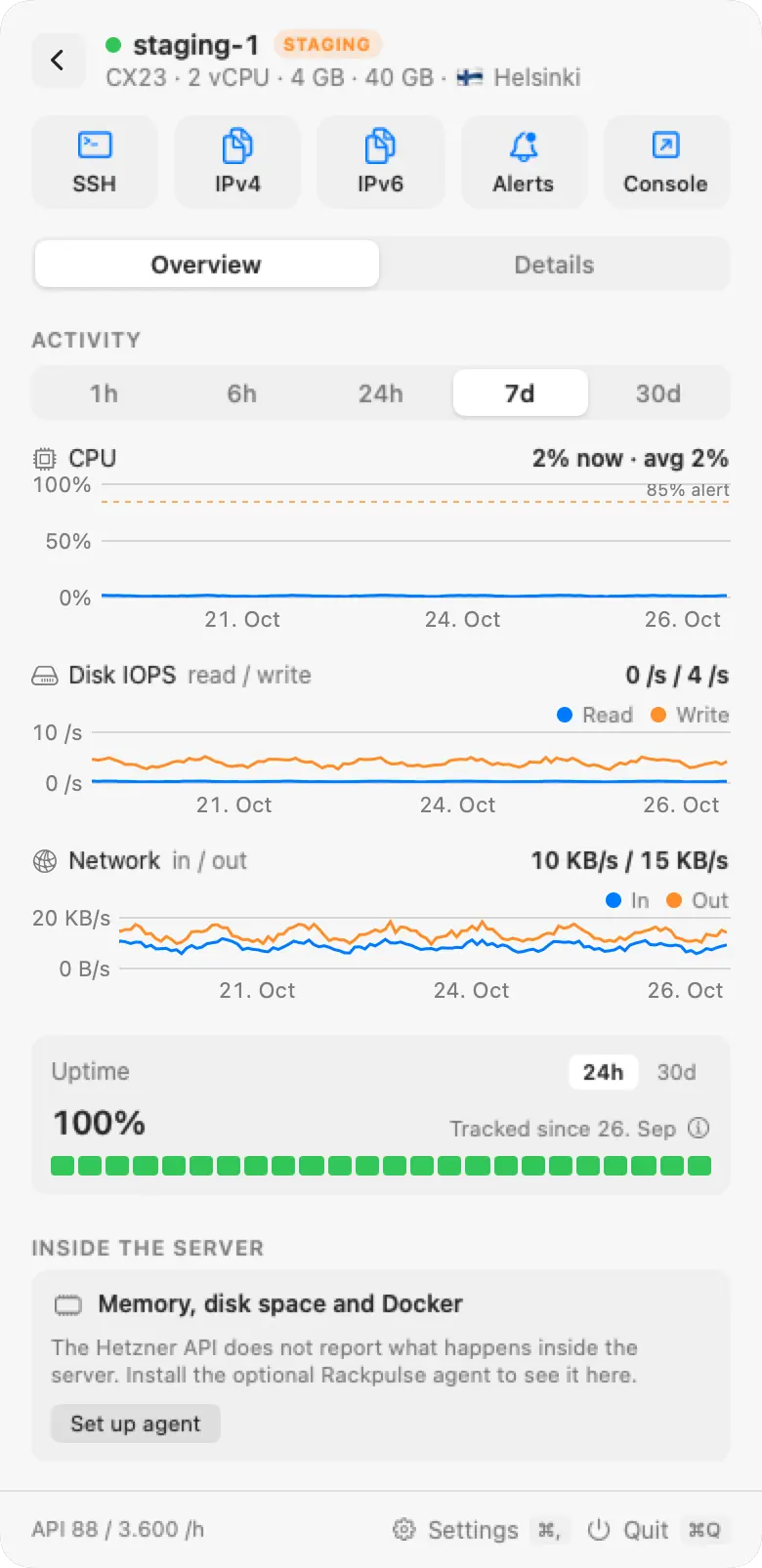
Costs
Month to date and the forecast to month end, per project, from the provider's list prices, with an optional budget. Stopped servers that still bill are listed separately. For a server on an older price, enter what you pay.
FinderFileEditView09:41
09:41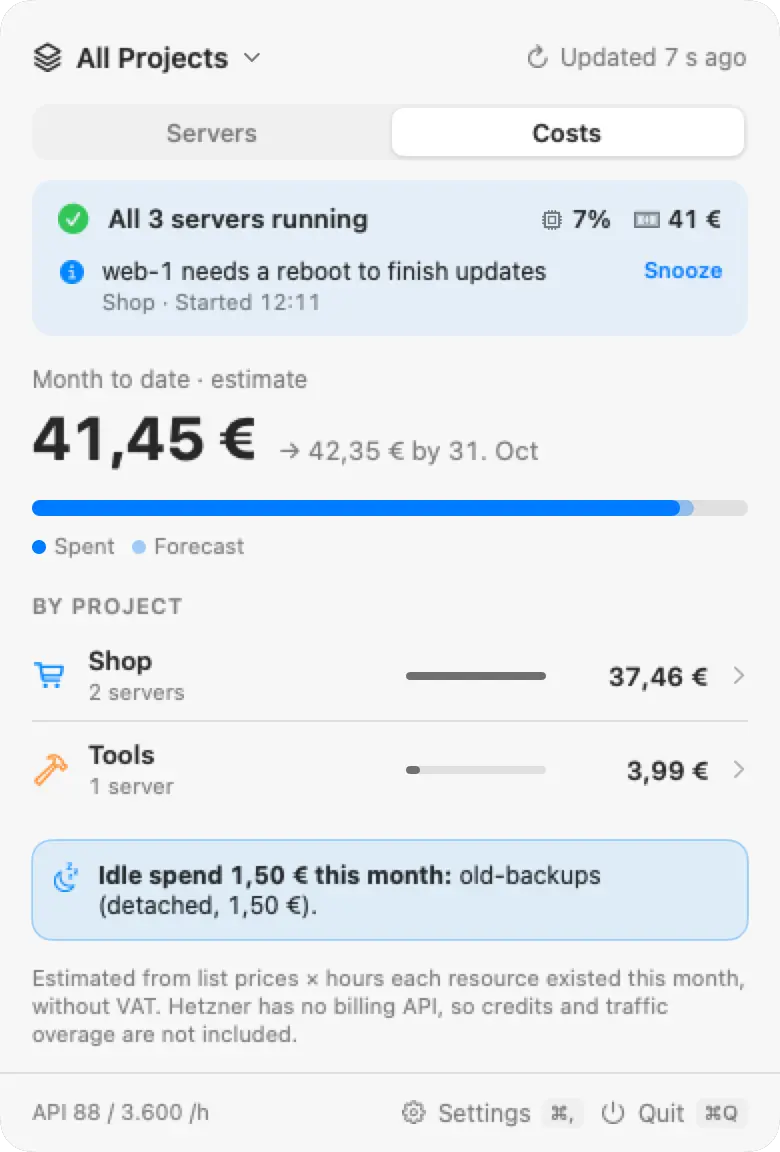
Menu bar readout
A status dot in the colour of the worst alert, plus the busiest server's CPU, this month's cost, or the alert count.


Power controls
Start, shut down, reboot, power off, and reset, each confirmed first. Needs a key that can write.
Keyboard and Touch ID
Press ⌃⌥R anywhere to open the panel, then type to find a server. Optionally lock the panel with Touch ID after the Mac sleeps.
See inside the server Agent
Memory, disk space, Docker containers, failed services, and pending reboots live inside the server, and a provider's API does not report them. The agent is a small read-only Linux program that reports them. Everything in this section needs it.
Memory and load
Memory use, load, and uptime since boot, with failed systemd services and pending reboots.
Disk space
Space and inodes per file system, with an alert when one fills up or turns read-only. The system disk is named by type, such as NVMe, SD card, or USB drive, with other drives listed below it.
Uptime on the server
30 days recorded on the server itself. It catches crashes the provider can't see and keeps history while your Mac sleeps.
FinderFileEditView09:41
09:41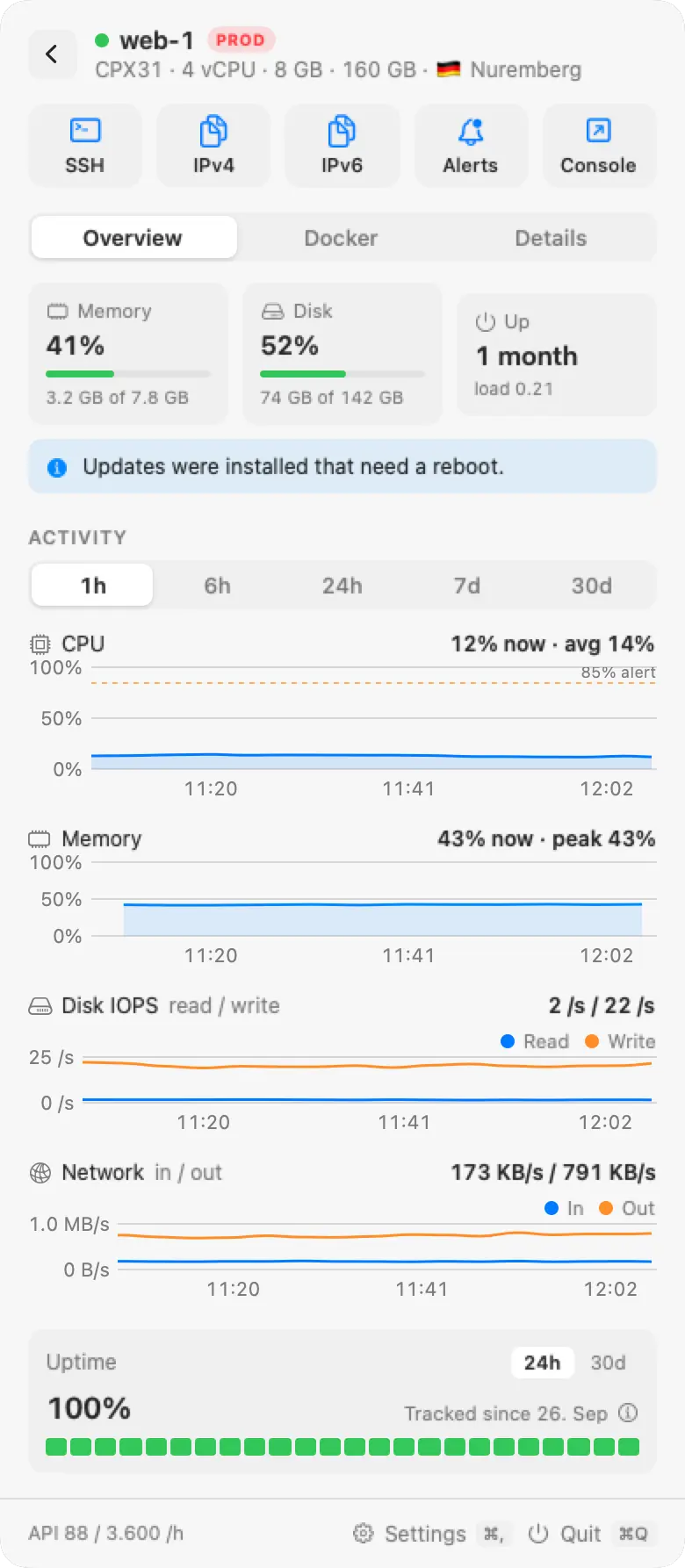
Docker containers
Grouped by Compose project, with health, restarts, CPU, and memory.
Docker disk usage
How much space images, volumes, and build cache take, and how much of it is reclaimable.
FinderFileEditView09:41
09:41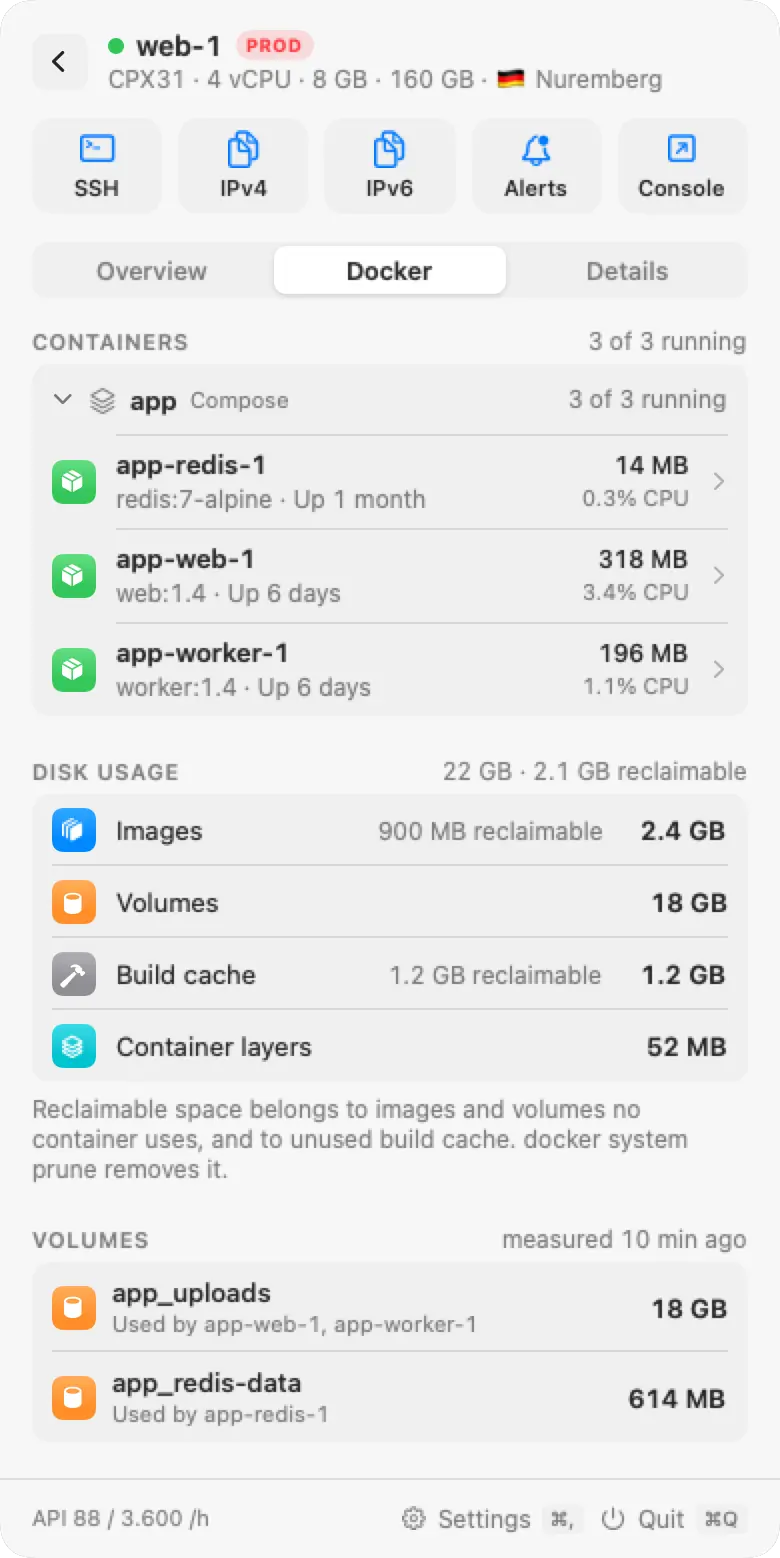
A page per container
7 days of charts, ports (local only or public), volumes and mounts, networks, and the last health check.
FinderFileEditView09:41
09:41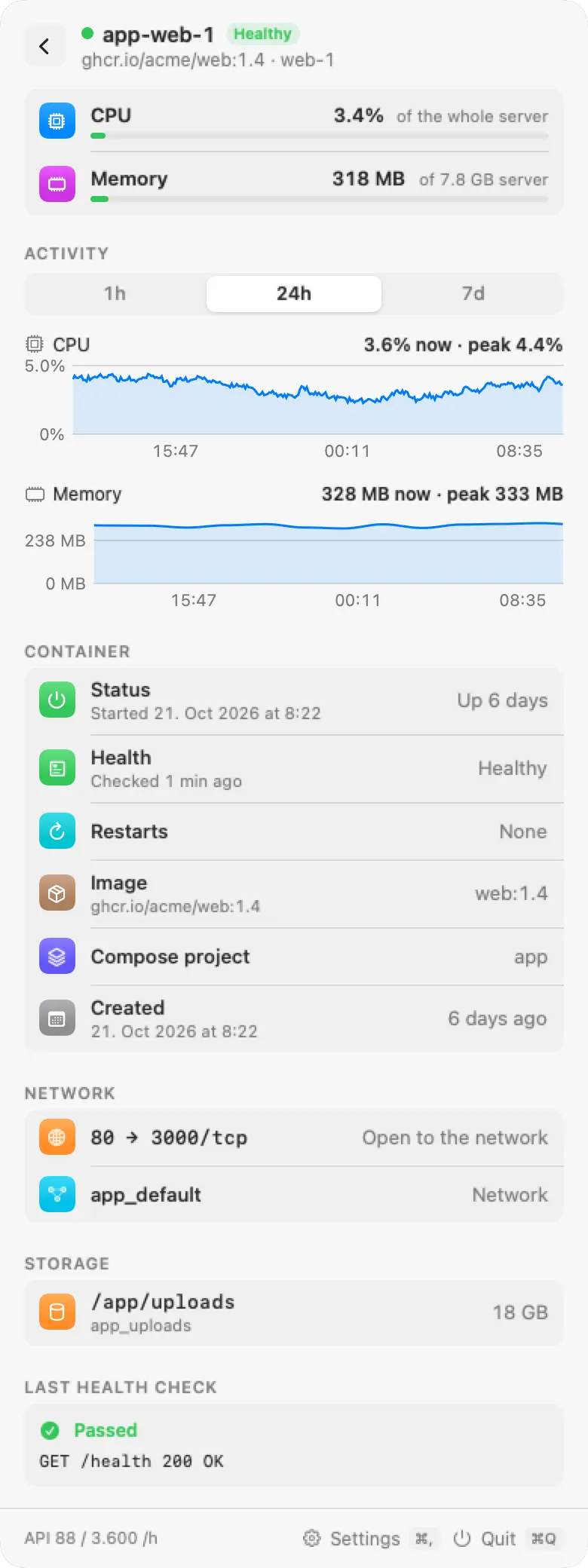
Servers with only the agent
Home lab, bare metal, or any cloud, in their own projects. They get the same CPU, disk I/O, and network charts, and the CPU and disk I/O alerts. Power controls, traffic, and the console are not available.
Live server page
While a server's page is open, its agent is read every 5 seconds. Agent data shows right after Rackpulse starts.
History on the server
CPU, disk reads and writes, and network every minute, with memory and disk space, kept for 31 days. Charts fill in when your Mac wakes up.
Set up the agent on a server
Open Set up agent
Open a server and choose Set up agent, or add a server with only the agent. Rackpulse creates a key for that server.
Choose how your Mac reaches it
Tailscale, a private network, a public IP, or another address. On a Mac with Tailscale, Rackpulse finds the server by its name in your tailnet.
Run the command on the server
The key is in the command. The script checks the binary's SHA-256 checksum, installs a systemd service, and allows the port in ufw if it is active. Rackpulse connects within a few seconds.
Linux on x86_64 and ARM64, as a systemd service under its own user. Read-only: it can't run commands or change anything.
Rackpulse reaches the server through your tailnet, by its name in Tailscale or its 100.x address.
Rackpulse connects to the server's private address. Your Mac must reach the private network, for example through a VPN server in it.
Rackpulse connects to the server's public IPv4 or IPv6 address.
A VPN or other address your Mac can reach, for example 10.8.0.5 or web-1.vpn.example.
curl -fsSL https://rackpulse.app/agent/install.sh | sudo sh -s -- --pair rb1_... --listen tailscale
curl -fsSL https://rackpulse.app/agent/install.sh | sudo sh -s -- --pair rb1_... --listen 10.0.0.5
curl -fsSL https://rackpulse.app/agent/install.sh | sudo sh -s -- --pair rb1_...
curl -fsSL https://rackpulse.app/agent/install.sh | sudo sh -s -- --pair rb1_... --listen 10.8.0.5
Firewall
No cloud firewall rule is needed. The agent listens only on the server's Tailscale address, and the installer allows the port on tailscale0 if ufw is active.
No public rule is needed. The agent listens only on the private address, and the installer allows the port in ufw if it is active.
Allow TCP 7311 in your provider's firewall, for example a Hetzner Cloud Firewall. Allow only your Mac's address if you can. The installer opens the port in ufw if it is active.
The installer allows the port in ufw if it is active. Open TCP 7311 in any other firewall between your Mac and the server.
The key in the real command is the server's own, in place of rb1_...
Update the agent
Run the script again without --pair. It keeps the key, port, and address. To change a paired agent's address, edit it in Rackpulse; there is no need to pair again.
curl -fsSL https://rackpulse.app/agent/install.sh | sudo sh
Remove the agent
Run this on the server. It removes the agent, its user, its data, and its ufw rule. Then remove any cloud firewall rule for the port, and choose Remove agent in Rackpulse.
sudo rackpulse-agent uninstall
Alerts when something goes wrong
Each rule has its own threshold and duration. A server can use the global rules, its own thresholds, or no alerts.
CriticalWarningInfoThe default severity of each rule. The menu bar dot takes the colour of the worst alert.
| Rule | Fires when | Needs |
|---|---|---|
| Server down | A server is not running and you did not stop it | Provider key |
| Sustained CPU | CPU stays above the threshold for the whole period | Provider key or agent |
| Traffic quota | Outgoing traffic passes a share of the included traffic | Provider key |
| Disk I/O anomaly | Disk IOPS stay above a multiple of the 7-day median | Provider key or agent |
| Budget | The month's cost forecast goes above the project's budget | Provider key |
| Unexpected change | A server or volume appears or disappears, a server is rebuilt, or a firewall changes | Provider key |
| Disk space | A file system passes a share of its space or inodes, or turns read-only | Agent |
| Memory | Memory use stays above the threshold for the whole period | Agent |
| Docker containers | A container is unhealthy, keeps restarting, or stopped with an error | Agent |
| Failed service | A systemd service is in the failed state | Agent |
| Reboot required | Installed updates need a reboot | Agent |
| Agent not answering | The provider says the server runs, but the agent does not answer, for example because it froze | Agent |
Notifications
Each alert notifies once, also after Rackpulse restarts, with Snooze and Open buttons, grouped per server in Notification Center. Many alerts at once arrive as one notification.
Delivery per rule
Choose a notification, a daily summary at the time you set, or the popover only.
Quiet hours
Notifications that arrive during the hours you set are sent as one summary when they end.
Snooze
From the notification or the popover, to silence an alert for 24 hours.
Only your provider, the update feed, and your agents
No account, no telemetry.
Where data goes
Rackpulse talks to your provider's API, its own update feed, and the agents you set up. Nothing else.
Keychain
API keys and agent keys are stored in the macOS Keychain, never in files or logs.
App Sandbox
Runs in the macOS App Sandbox with outgoing network access only. Signed and notarized by Apple.
Limited changes
With a read-only key, Rackpulse can't change anything. With a key that can write, it only sends the power actions, after you confirm.
Read-only agent
The agent can't run commands or change anything, only reads from Docker, and runs sandboxed by systemd.
Per-server keys
Each server has its own key, and the agent's certificate is pinned on the first connection. Change a key from the app at any time.
Install Rackpulse
Install the app
Open Rackpulse.dmg and drag Rackpulse to Applications.
Create an API key at your provider
For Hetzner Cloud: in the Hetzner Console, open a project and go to Security, then API tokens. Choose Read to monitor only, or Read & Write to also use the power controls. For a server with only the agent, skip this step.
Add servers
Click the Rackpulse icon in the menu bar and choose a provider: paste the key and click Verify and Save, one key for each project. Or add a server with only the agent.
Set up the agent on a server Agent
Open a server, choose Set up agent, and run the command it shows. Skip this step to use only the provider key. The agent
Requirements
- Mac
- macOS 14 Sonoma or later
- Provider
- An API key per project for Hetzner Cloud, or none for servers with only the agent
- Server
- Linux on x86_64 or ARM64 with systemd Agent
- Network
- The agent's TCP port, 7311 by default, reachable from your Mac Agent
Rackpulse checks its update feed once a day and asks before it installs an update. To build from source, see the README.
Get help
GitHub issuesReport a bug or request a feature. Search the open issues first.
DiscordAsk a question, share an idea, or tell us which provider you want next.
@en3sis on XSend a message or a mention for questions and feedback.
For a bug report, include
- Your macOS version
- The Rackpulse version, from About
- What you expected to happen
- If the agent is involved, its version from the agent setup page
To report a security problem, see SECURITY.md.
Questions and answers
Which providers does Rackpulse support?
Hetzner Cloud today. Servers on any other host can run the agent alone, with no provider account. AWS, DigitalOcean, and Railway are listed in the app as coming soon. Tell us on Discord which provider you want next.
Do I need to install anything on my servers?
Not with a supported provider. Rackpulse works with a provider's API key, and the agent is optional. It adds memory, disk space, Docker containers, and uptime recorded on the server. A server without a supported provider needs the agent.
Which key permission should I choose?
A read-only key to monitor. A key that can write if you also want to start, shut down, reboot, power off, or reset servers from Rackpulse. On Hetzner Cloud, these are Read and Read & Write tokens.
How accurate are the costs?
They are estimates from the provider's list prices and the hours each resource existed this month. Hetzner has no billing API, so credits and extra traffic are not included. VAT is added only when you choose prices with VAT in Settings. Servers with only the agent count only with a price you enter.
Does the agent need a public port?
No. Your Mac connects to the agent on TCP port 7311. Over Tailscale, another VPN, or a private network, no public rule is needed. On a public address, add an inbound rule to the server's cloud firewall. The installer adds the ufw rule itself.
Does Rackpulse send my data anywhere?
Only to your provider's API, its own update feed, and the agents you set up. There is no account and no telemetry.
How do I remove the agent?
Run sudo rackpulse-agent uninstall on the server. It also removes the ufw rule it added. Remove any cloud firewall rule yourself, and in Rackpulse choose Remove agent on the server page.
How does Rackpulse update?
Rackpulse checks for updates once a day and asks before it installs one. To update the agent, run the install command on the server again without --pair. It keeps its key, port, and address.
Is Rackpulse free?
Yes. Rackpulse is open source under the MIT License. It is an independent project, not affiliated with Hetzner Online GmbH or any other provider.