 Rackpulse
Docker monitoring for Hetzner servers
Agent Install the Rackpulse agent on a Hetzner Cloud server, and its Docker containers appear in the Mac menu bar, grouped by Compose project, with health, restarts, CPU, and memory.
macOS 14 or later. Needs a Hetzner Cloud API token. Free and open source. No account, no telemetry.
What you see
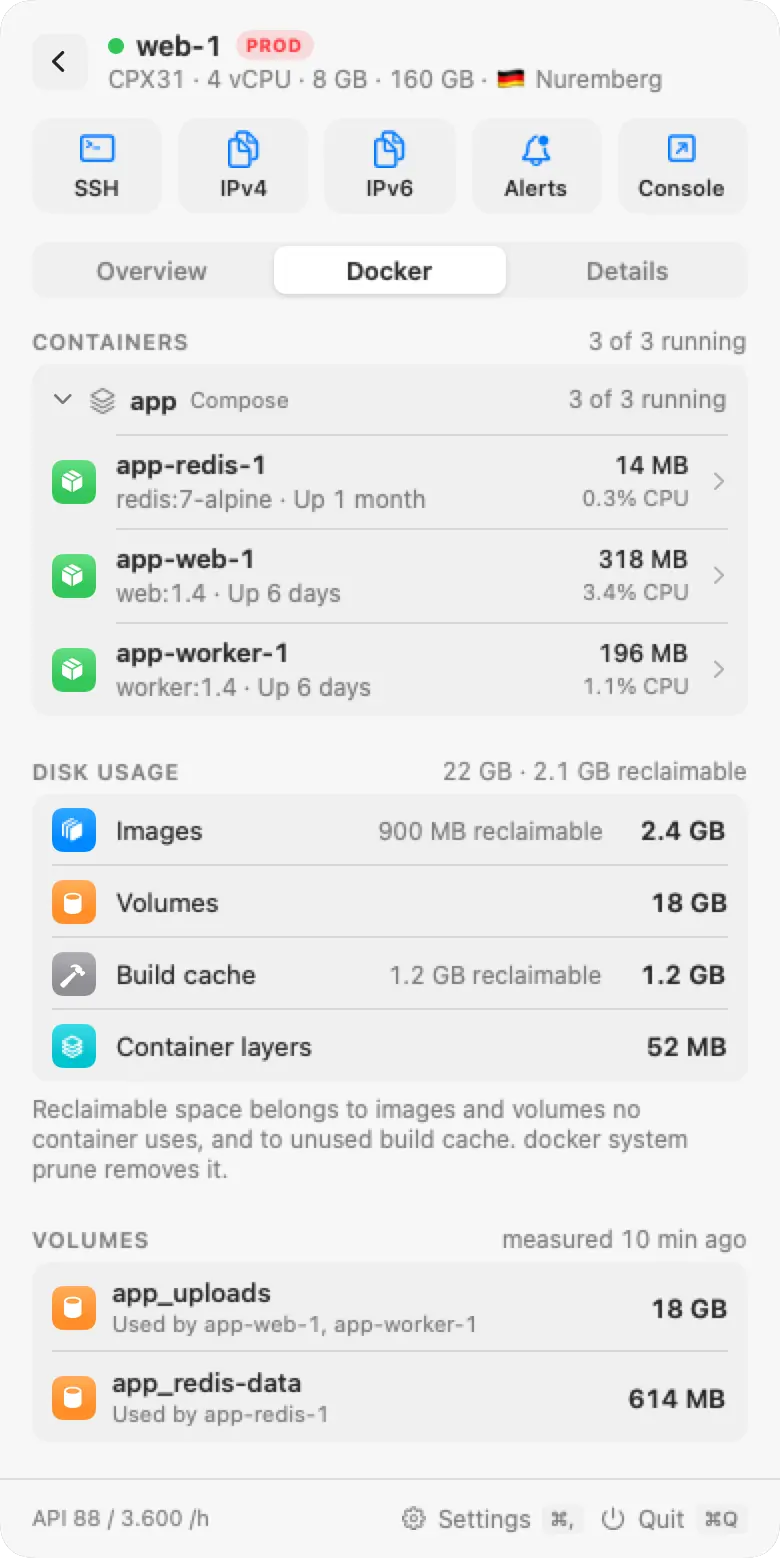
- Containers by Compose project, with state, health check result, restarts, CPU, and memory. Compose projects can be opened and closed, and stopped containers have their own group.
- A page per container with 7 days of CPU and memory, its ports (local only or public), volumes and bind mounts, networks, and the last health check output.
- Docker disk usage: how much space images, volumes, build cache, and container layers take, and how much of it no container uses.
Container alerts
The Docker containers rule fires when a container is unhealthy, keeps restarting, or stopped with an error in the last hour. A notification looks like "web-1: app-worker restarted 14 times in the last hour". The Disk space rule covers the file system that Docker writes to.
Rackpulse and other Docker tools
| Tool | What it shows | History |
|---|---|---|
docker ps, docker stats | Containers and live CPU and memory, on one server, in a terminal over SSH | None |
docker system df | Disk usage of images, containers, volumes, and build cache | None |
| Portainer | A web interface that lists and manages containers, and can change them | Depends on setup |
| Rackpulse | Containers of all your Hetzner servers in the menu bar, read-only, with alerts | 7 days per container |
Set up the agent
- Open the server in Rackpulse and choose Set up agent. Rackpulse shows a command with a key for this server.
- Run the command as root on the server. If Docker is installed, the agent's user joins the
dockergroup. - Make TCP port 7311 reachable from your Mac. Over Tailscale or a private network you don't need to open anything.
curl -fsSL https://rackpulse.app/agent/install.sh | sudo sh -s -- --pair rb1_...
The agent measures Docker's disk usage every 15 minutes and keeps one sample per minute for 24 hours and one 5-minute average for 7 days. A container that has not been seen for 7 days is dropped.
Questions and answers
Can Rackpulse start, stop, or restart containers?
No. The agent only sends read requests to the Docker API. It has no endpoint that runs a command or changes anything on the server.
Does it work with Docker Compose?
Yes. Containers are grouped by their Compose project label. A container recreated by Compose keeps its history, because samples are kept per container name.
Does the agent need root?
The install command runs as root once. The agent then runs as its own rackpulse user, which joins the docker group to read the Docker API. Members of that group can control Docker, so the agent runs with systemd sandboxing: read-only file system, no new privileges, no capabilities.
What if Docker is not installed?
The agent still reports memory, disks, services, and uptime. The Docker tab stays empty.